- 人工智能網站建設者
- 域名
- 電子邮件
- 会计软件
- 针对分销商白色标签
- 學

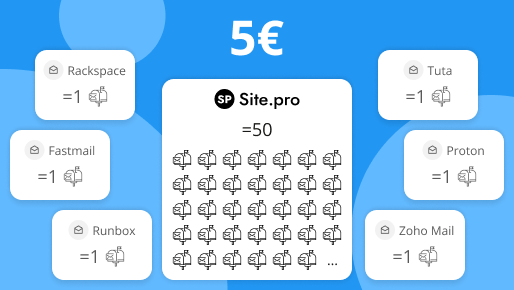
Email is the backbone of business communication, but the way providers price and package email hosting can make choosing the right solution surprisingly difficult. At first glance, many services seem affordable. However, hidden limitations can increase costs as your business grows. What looks inexpensive on paper doesn’t always provide real value in practice.
In this article, we take a closer look at how pricing per plan compares to the cost per mailbox. The ability to create multiple mailboxes is one of the most important factors — and also one of the least obvious — when it comes to choosing an email service.
We’ll also share a few tips on how to use multiple mailboxes to keep your email organized and easy to manage.
We selected the most popular independent email hosting platforms that provide plans meant purely for email. Chosen plans are meant for small companies with less than 50 team members, where each of them needs a separate mailbox and an email address.
We focused specifically on how the cost of a subscription compares to the price of a single mailbox, as this is an important factor in determining the final cost of professional email and is often overlooked.
We did not compare any other features. This table compares only the overall price, the price per mailbox, and the number of aliases that can be attached.
| Provider | Plan | Price/month | Mailboxes | Aliases | Price/mailbox |
|---|---|---|---|---|---|
| Site.pro | Professional | 4.50€ | 50+ | Unlimited | 0.09€ |
| Proton | Mail Plus | 3.99€ | 1+ | 15 | 3.99€ |
| Zoho Mail | Workplace Standard | 2.70€ | 1+ | 30 | 2.70€ |
| Rackspace | Rackspace Email | 8.42€ | 1+ | 1 | 8.42€ |
| Fastmail | Standard | 5.00€ | 1+ | 600 | 5.00€ |
| Tuta | Advanced | 8.00€ | 1+ | 30 | 8.00€ |
| Runbox | Medium | 3.50€ | 1+ | 100 | 3.507€ |
| Mailbox.org | Standard | 2.50€ | 1+ | 25 | 2.507€ |
| Hushmail | Standard | 8.37€ | 1+ | Unlimited | 8.37€ |
| Posteo | Standard | 1.00€ | 1+ | 2 | 1.00€ |
Information updated: 2026-02-11
As you can see, the cheapest plan does not necessarily translate to the cheapest service. In our research, we found that most providers offer one mailbox per one account. If you need to separate mail into multiple mailboxes, you have to buy an extra license for each extra one.
Site.pro uses a “zero scale” strategy, which is intended to keep email hosting costs low.
Several factors contribute to the pricing structure:
All Site.pro plans, including the free plan, include multiple mailboxes. The number available ranges from 5 to 500 per plan, allowing individual mailboxes for team members as well as separate mailboxes for different projects or functions.
Each mailbox can have an unlimited number of aliases. Currently, aliases must share the same core domain as the primary email address. For example, if the main address is hello@example.com, all aliases must also use the @example.com domain.
It is recommended to use multiple email accounts to improve:
Cybersecurity specialists warn against using one email for everything because it creates a single point of failure. If that account is compromised, attackers will gain access to banking, social media, and work platforms at once. Separating accounts limits the damage and protects sensitive information.
Security analysts report that using separate email accounts for different services can reduce credential-theft risk and lower exposure to phishing attacks by compartmentalising data.
Organisational benefits are also a big factor. Multiple mailboxes keep primary inboxes free from clutter and allow you to categorise communication by work, personal life, subscriptions, and finances. This structure improves message tracking, reduces missed emails, and simplifies daily communication management.
For freelancers and businesses, dedicated accounts for clients or projects provide clearer communication and reduce confusion between conversations. This segmentation helps maintain professionalism and ensures that important information does not get lost in a single overloaded inbox.
You can manage your mailboxes without any problems if you follow these simple tips.